
RTOs: 2 ways to build eLearning from a Unit of Competency
Coursebox can turn a Unit of Competency (UoC) from training.gov.au into learning materials in 2 ways. This article explains both, when to use each, and which one we recommend.
Short answer: use the 2-part process (Approach 2). Create and finalise your RTO documents first, then build the eLearning course from those documents. This gives you the most control over how every requirement, including Knowledge Evidence, is taught.
Why there are 2 approaches
A UoC has several parts: Elements and Performance Criteria, Knowledge Evidence, Performance Evidence and Assessment Conditions. The RTO documents are mapped against all of these.
The one-step eLearning course is built from the same unit, but it tends to organise its learning sections around the Elements and Performance Criteria. Knowledge Evidence can end up in a separate Knowledge Activity Questions section, instead of being taught inside the relevant learning sections.
If your auditors or trainers need every Knowledge Evidence item explained, with examples, inside the learner content, use the 2-part process.
Approach 1: one step, from the UoC URL to eLearning
You paste the unit's training.gov.au URL into Create RTO Package, review the unit configuration (AQF level, qualification, role and description, assessment types, audience and entry requirements) and click Build course. Coursebox creates the 5-document RTO package and an eLearning course at the same time. For the full steps, see Create a Course using the Unit of Competency (UoC).
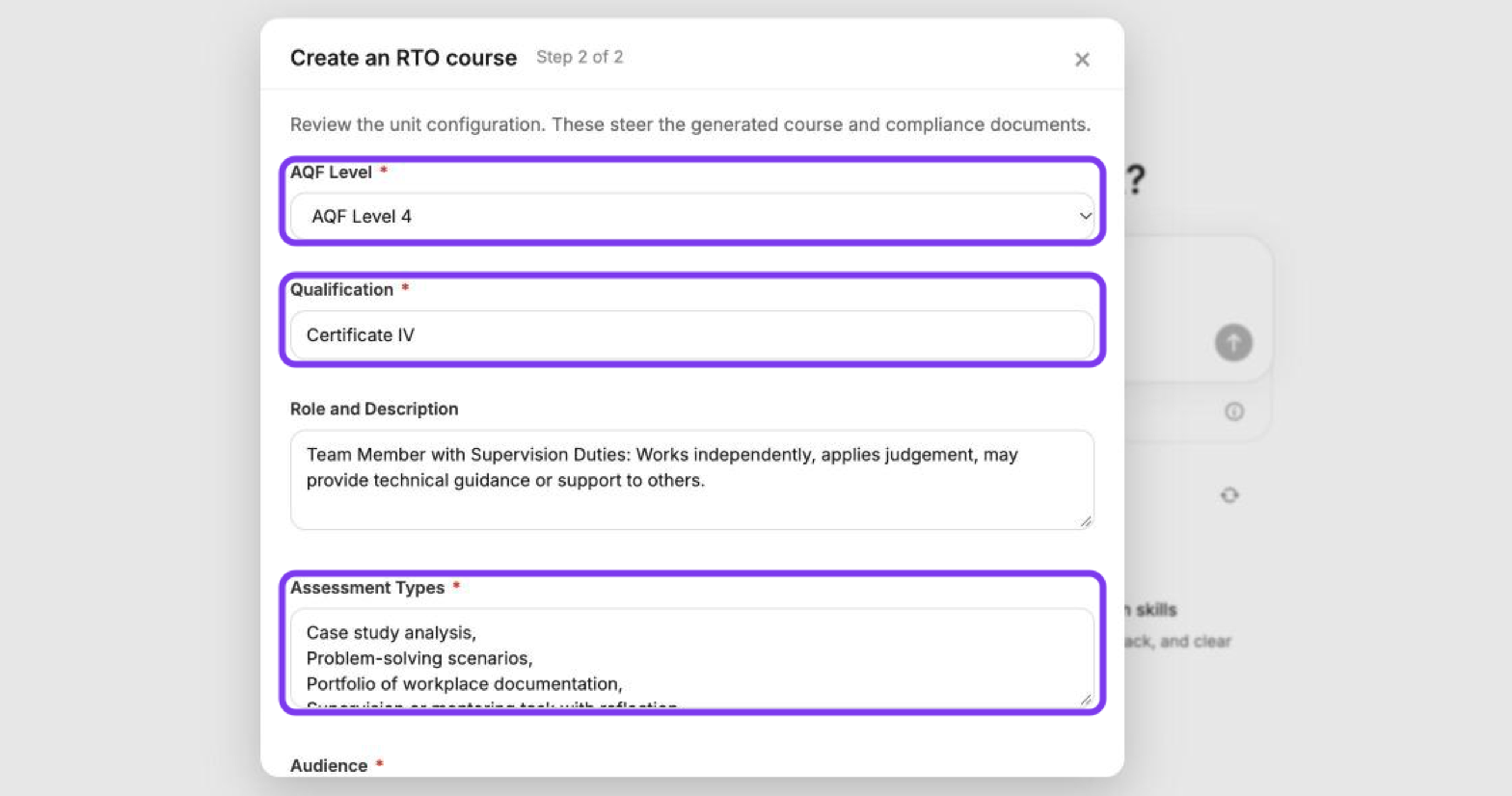
Good for: a quick first look at how a unit could be structured.
Status: the eLearning course from this flow is our earlier output, and we don't recommend using it as your final learner course. The RTO documents it produces are the useful part.
Limitations: Knowledge Evidence can end up in a separate question section instead of being taught within the learning sections. What you write in Role and Description steers the output, but it doesn't override the course structure.
Approach 2 (recommended): RTO documents first, then eLearning
Part 1: Create and finalise the RTO documents
Create the RTO package from the unit's training.gov.au URL, the same way as in Approach 1. See How can RTOs create a course from a training.gov.au URL? This also creates an eLearning course, which you can ignore.
Export the 5-document package as a zip file.
Review and finalise the documents. Use Claude or ChatGPT to check them against the unit, or work with a trainer, compliance lead or instructional designer to finalise the Word documents and the mapping. Make sure every Knowledge Evidence item is covered in the detail you need. See What should I do after exporting my RTO Pack?
Part 2: Build the eLearning course from your finalised documents
Click + Create at the top of the left-hand menu.
In the prompt box, click +, select Add files and choose your finalised documents.
In your prompt, ask for a Strict Import. For example: Use Strict Import and keep my documents' structure and wording. If the documents include assessment tasks you want in the course, say so in the same prompt.
Check the course outline, then click Generate course.
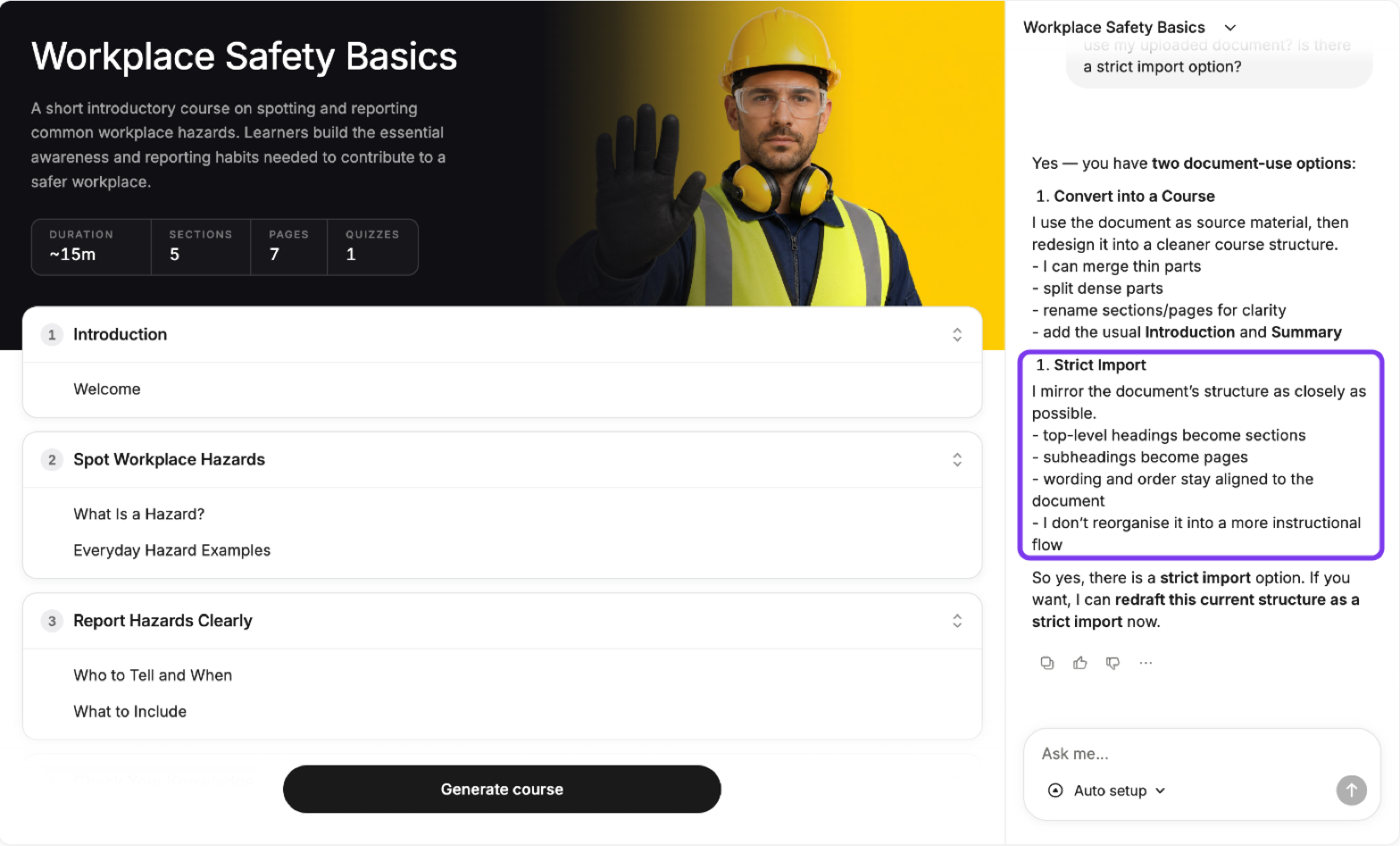
With Strict Import, the AI mirrors your documents: top-level headings become sections, subheadings become pages, and the wording and order stay as they are in the documents. If you don't ask for it, the AI may Convert into a Course instead and reorganise your content into its own structure.
Refine each page with the AI Editor. Open a page, click the AI Editor icon (the sparkle) in the top toolbar, and ask it to add examples or subheadings, or tighten the wording.
Test for gaps before you enrol learners. Install Claude in Chrome, open the course in learner view and ask Claude to check the content against the unit's Knowledge Evidence and Performance Criteria and list anything that isn't covered. Fill any gaps before you enrol learners. See How do I use Claude with the Chrome extension in Coursebox?
Which approach should I use?
Approach 1: one step | Approach 2: documents, then eLearning (recommended) | |
|---|---|---|
Speed | Fastest | Slower, includes a review step |
Control over Knowledge Evidence coverage | Limited | Full, because you finalise the documents first |
Compliance documents | Yes, the 5-document package | Yes, reviewed and finalised by you |
eLearning course quality | Earlier output, not recommended | Built from your approved content |
What's coming
We're improving both the document-to-course builder and the RTO eLearning builder. See the Coursebox Product Roadmap for what's planned.
Need help?
We offer free training on the 2-part process. Book a session and mention you're an RTO.