
How do I track learner progress and download reports?
Plan requirement: Basic reports — who is enrolled, how far learners have progressed through each section, and their assessment scores — are available on every plan, including Free. The full advanced reporting dashboard described below, including CSV export, is available on Pro + LMS and Enterprise. Compare plans.
On an earlier plan? Plan names and inclusions changed when we moved to Free, Creator, Pro, Pro + LMS and Enterprise. If you are on an earlier plan, your subscription continues unchanged and you keep everything it included — so you may still see features this article lists under a higher plan. Nothing has been removed from your account.
The Pro + LMS reporting and analytics dashboard helps Super Administrators and Facilitators monitor learner activity, track progress and evaluate course effectiveness — including completion rates, time spent and assessment results.
Open the Reports section
Click Reports in the left-hand side navigation bar to access the report section.

Filter and download a report
You can filter the report based on:
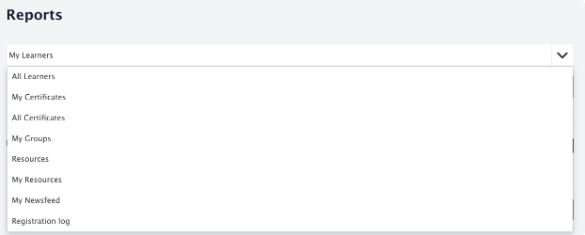
Types of report: click the dropdown menu and select the type of report you want to view.
Date range: select your date range by changing the Start Date and End Date inputs.
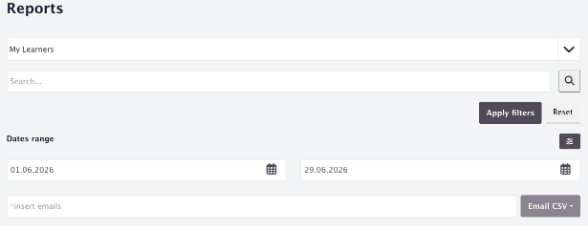
User type: click the filter icon to select users based on their status. You can generate reports for active users, archived users, and unconfirmed users.
Once you have set your filters, click Apply Filters to generate the report. You can reset to the default filter settings by clicking Reset.
To download a report, click the download icon on the report — it downloads as a .CSV file that you can open in Excel or Google Sheets. Course reports can be downloaded even while a course is still in Draft status.
For more information on reports, see Report Management.