
How do I Export or Upload my Course to Udemy, Coursera and Other Platforms
A common question before buying is whether Coursebox integrates directly with Udemy or Coursera. It does not connect to them as a built-in integration, but you can still get your course onto Udemy, Coursera, and other platforms in several ways. What works depends on where you want the course to go. This guide covers the destinations people ask about most, and points you to the exact export steps for each one.
For the step-by-step export instructions, see .
Where can I use my course?
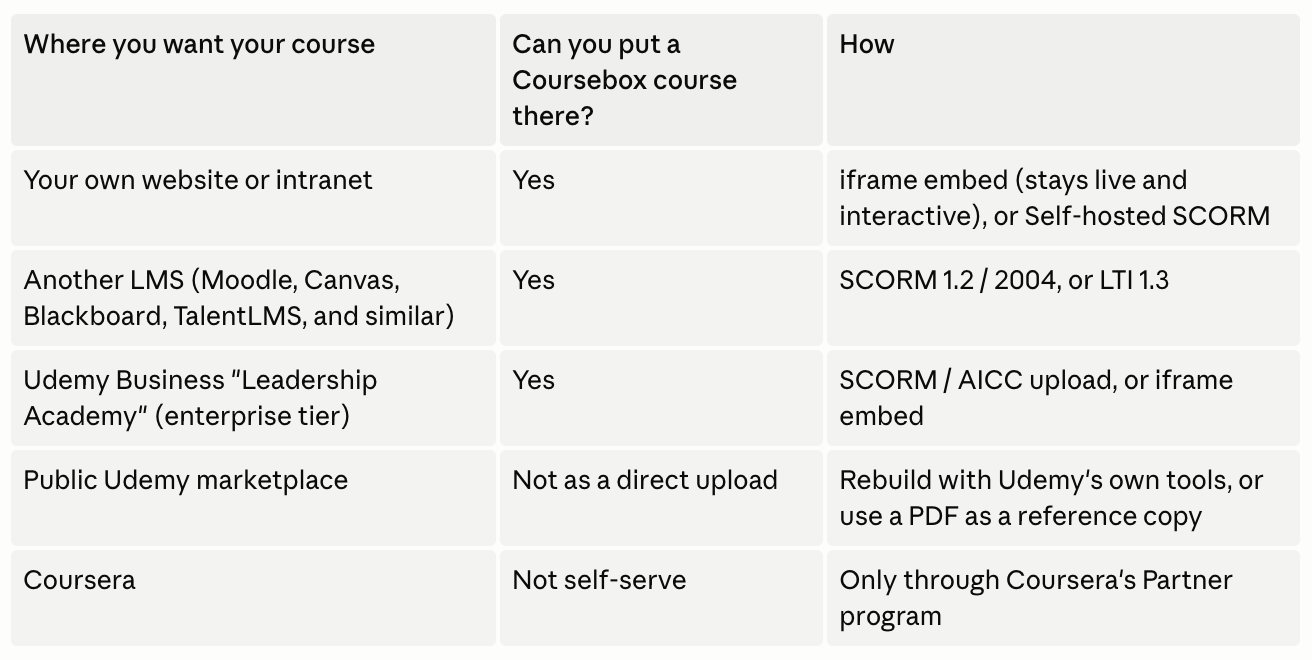
Can I add my course to my website or another LMS?
This is where Coursebox works best.
Your website, intranet, or any page that accepts an iframe: publish the course, then copy the iframe from the Share panel and paste it in. The course stays live and interactive, with videos and quizzes intact.
Another LMS (Moodle, Canvas, Blackboard, Docebo, aXcelerate, and similar): export as SCORM 1.2 or 2004, or connect with LTI 1.3 for grade passback. See the export article for the full setup and the per-LMS upload links.
Can I upload my course to Udemy?
Which route applies depends on which Udemy you mean.
The public Udemy marketplace (where independent instructors sell courses) does not accept SCORM or HTML uploads. Courses there are built with Udemy's own video, lecture, and quiz tools (). You can use a Coursebox PDF export as a reference copy while you rebuild, but the interactive course itself cannot be uploaded.
Udemy Business "Leadership Academy" is a separate enterprise product for organisations on a Udemy Business plan. It does accept SCORM / AICC uploads () and can embed external content via iframe (), so a Coursebox course can go there if your organisation has that tier.
Can I upload my course to Coursera?
Coursera is not an open marketplace, so there is no self-serve upload for individual creators. Courses go live only through Coursera's Partner program, which is for universities, companies, and organisations. If that route fits you, is the place to start.
Which plan do I need to export?
Course export is not included on the Free plan. Dynamic (Standard) SCORM, along with PDF and HTML export, is available on Creator and above. Self-hosted SCORM and LTI 1.3 are available on Pro and above.
What happens to my exported courses if I cancel?
This is the part worth understanding before you rely on an export.
Standard SCORM and LTI exports are a small wrapper that calls back to Coursebox at runtime. They keep working only while your course stays published and your Coursebox account stays active. If you cancel or unpublish, they stop working, including packages you already exported. Standard (Dynamic) SCORM is available on Creator and above; LTI is available on Pro and above.
Self-hosted SCORM is a standalone package that runs on your own server or LMS without a connection back to Coursebox. It keeps working independently, and is available on Pro and above. A few features that need a live connection are not included: listen mode, short-answer questions, assignment submissions, discussions, and the AI tutor.
HTML and PDF exports are static snapshots. They include your written content, quizzes, assignments, and uploaded images, but not videos, audio, or interactions. They are useful as backups or reference copies, not as a full live course.