
What is the AI Tutor in Coursebox?
The AI Tutor in Coursebox AI is an intelligent virtual assistant embedded directly into your course pages. It provides learners with instant, contextual support — answering questions, clarifying concepts, and guiding them through lessons, assessments, and activities in real time.
Designed to enhance engagement and reduce facilitator workload, the AI Tutor ensures learners feel supported throughout their learning journey.
The AI Tutor is not the same as AI feedback on assignments. The AI Tutor is the conversational chatbot learners talk to inside a course, and its tone, language and dialect can be steered by an admin. AI feedback is the automated marking commentary generated on assignment submissions — that is a separate feature with its own settings, and its language is not configurable. See Assignment Grading Options if you are asking about marking feedback.
Key benefits and features
Real-time assistance — instantly answers learner questions without delays
Multilingual support — communicates with learners in over 100 languages
Adaptive support — responds intelligently based on course content and learner context
Simplified explanations — breaks down complex ideas to improve understanding
Interactive learning support — assists with quizzes, discussions, and content navigation
Always available — provides 24/7 learner support with no scheduling required
Fully customisable — personalise the tutor’s tone, name, icon, knowledge base, and response limits
Highly scalable — supports large numbers of learners with a consistent experience
How the AI Tutor supports learning
The AI Tutor offers learners real-time support through a conversational interface. Whether you use the pre-trained Coursebox Tutor or create a custom chatbot, this tool delivers just-in-time assistance and makes learning more personalised and interactive.
With options to customise appearance, behaviour, voice, and knowledge base, the AI Tutor can be aligned with your course tone and learning outcomes.
Set the tutor’s response language or dialect
There is no global language toggle for the AI Tutor. Its response language — including a regional dialect such as Australian English, British English or US English — is set per course through the tutor’s own Instructions field.
Open the course, then click Course settings (the gear icon) in the top toolbar of the course editor and choose AI tutor (or click the pen icon on the AI chatbot bubble).
In the Instructions field, state the language or dialect you want — for example: “Always respond in Australian English, using Australian spelling and terminology.”
Save. The change applies to that course’s tutor only. To avoid repeating it for every course, add the same instruction in the Instructions field of the Tutor tab in a saved Course Setup, and apply that setup when you create each new course (see below).
You can combine this with tone, audience and scope instructions in the same field. For full setup steps, see How do I set up an AI Tutor chatbot?
Set up the AI Tutor when you create a course
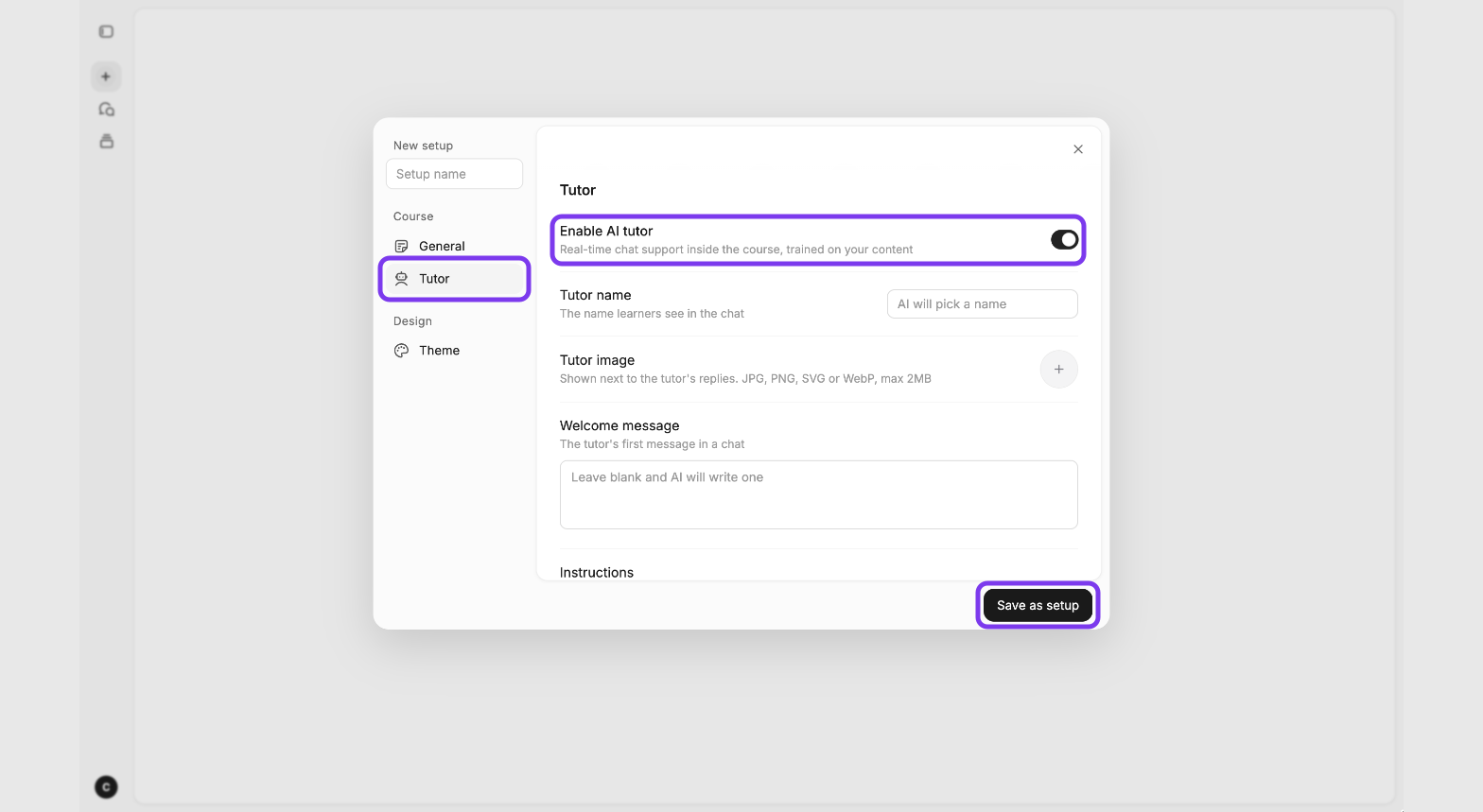
You can set up the AI Tutor before your course is generated, so it is ready from the first draft. Do this in the Tutor tab of your Course Setup.
Start a new course with AI and click the Auto setup dropdown below the prompt box.
Choose a saved setup, or click + New setup.
Under Course, click Tutor. Turn on Enable AI tutor, then set the Tutor name, Tutor image, Welcome message and Instructions. Leave the name or welcome message blank and AI will write them for you.
Click Save as setup to use the same tutor settings on future courses, so you don’t have to set it up again each time.
You can still change the tutor after the course is generated, in Course settings → AI tutor.
Learn how to set up and manage the AI Tutor
Detailed instructions for enabling, configuring, and managing the AI Tutor are available in the Coursebox Manual under AI Tools & Elements.
For step-by-step setup instructions, see https://support.coursebox.ai/article/ai-tools-elements