
Why is my restricted course showing on the login page?
This happens when public course visibility is still enabled at the portal level, even if individual courses are set to Restricted.
Correct fix
Go to Profile Icon → Settings.
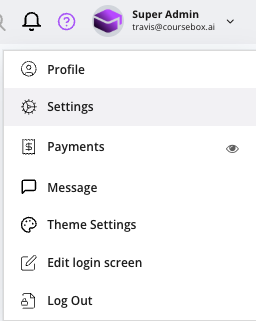
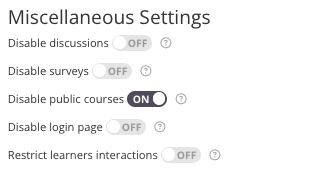
Scroll down to Miscellaneous Settings.
Toggle Disable Public Courses → OFF.
Stop members or learners from seeing the “All” courses tab
If you don't want a membership or learners to browse every course via the All courses tab, you have two options:
Disable Public Courses (steps above) so only the courses a learner is enrolled in are visible, not the public catalogue.
As a Super Admin, hide the Courses menu item for members in your left-menu (menu visibility) settings, so the All courses tab no longer appears for them.
For granular control over what each user type can see, see User Types, Access, Permissions & Visibility.
Common questions this article answers
How do I stop my membership from accessing the “All” courses tab?
How do I hide the Courses menu or course catalogue from learners?
How do I stop learners from seeing other courses they are not enrolled in?
How do I restrict course visibility so members only see their own courses?