How do I use leaderboards to engage learners?
Badges serve as visible achievements, while the Leaderboard takes gamification a step further by allowing learners to see how they rank in relation to others on the platform.
Together, badges and the leaderboard create a dynamic and competitive learning environment that supports individual progress.
Plan requirement: The leaderboard, badges, points and pathways are part of Gamification, available on Pro + LMS and Enterprise. On Free, Creator and Pro, Achievements shows Certificates only — there is no Badges tab or leaderboard on those plans, and their absence is not a fault with your account. Compare plans.
On an earlier plan? Plan names and inclusions changed when we moved to Free, Creator, Pro, Pro + LMS and Enterprise. If you are on an earlier plan, your subscription continues unchanged and you keep everything it included — so you may still see features this article lists under a higher plan. Nothing has been removed from your account.
How the leaderboard works
Badges recognise learner achievements.
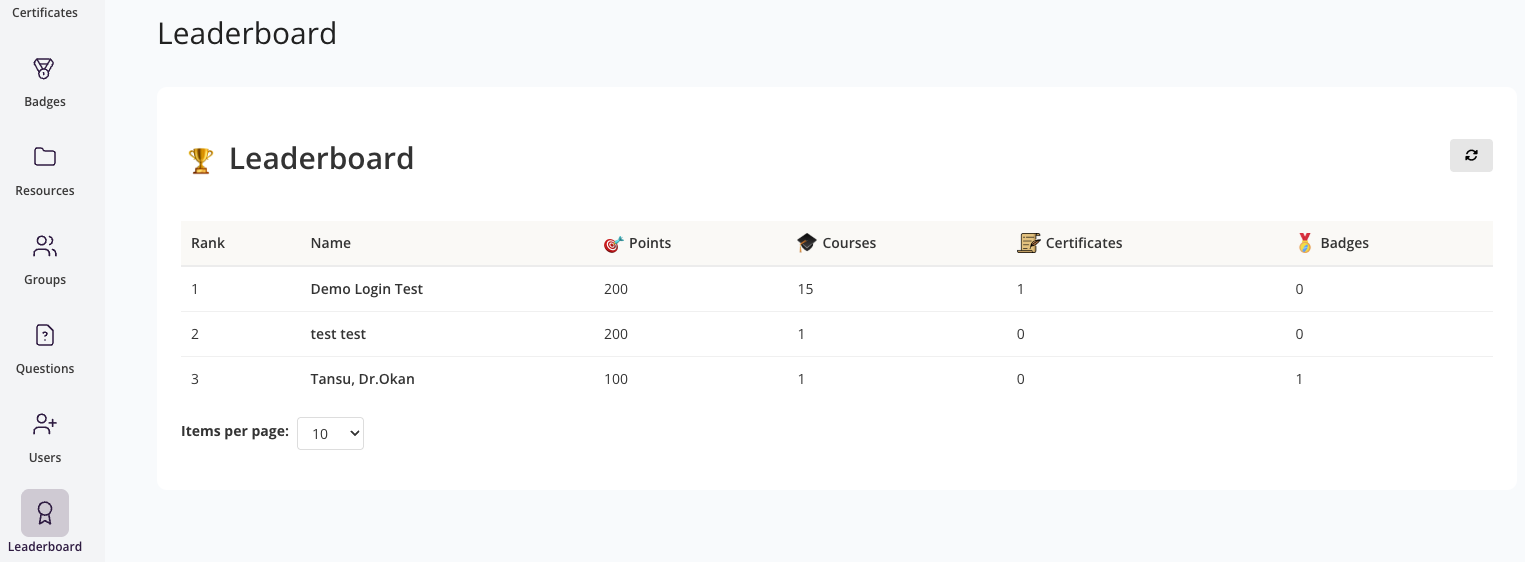
The Leaderboard displays these achievements in context, showing:
Rank — position in comparison to other learners.
Name — learner's name.
Points — total points earned.
Courses — number of completed courses.
Certificates — certificates awarded.
Badges — total badges achieved.
How to Access the Leaderboard
From the main menu, click Leaderboard.
The leaderboard screen will appear, showing learner rankings across the platform.