
Integrations Settings
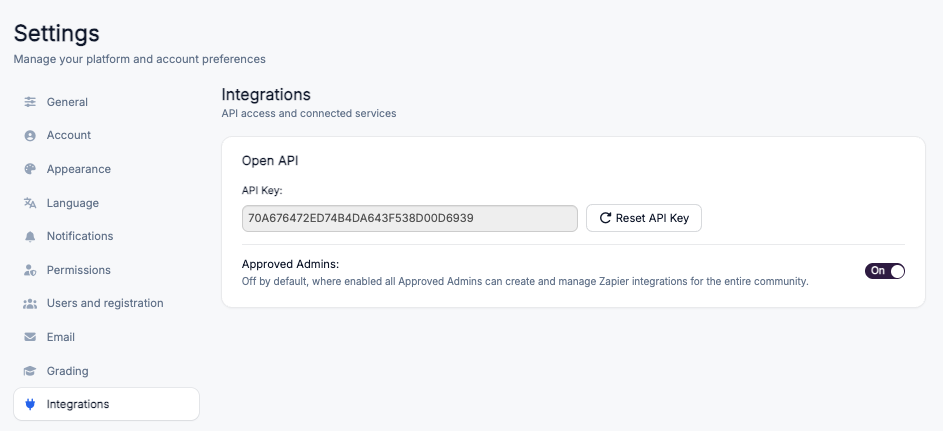
The Integrations settings page lets Super Admins manage how Coursebox connects to external tools and automation services. From here you can access your Open API key, reset it when needed, and control whether Approved Admins are allowed to build and manage Zapier integrations for your community.
Plan requirement: The Open API is an add-on on Pro + LMS and included on Enterprise, so the Open API section described below appears on those plans. Compare plans.
Open API
Coursebox provides an Open API that lets enterprise clients and training organisations automate learner management and connect Coursebox to other systems such as a CRM, HR platform or ERP.
API Key
Your API Key is the credential that authorises external services to connect securely to your Coursebox portal. To access it:
Log in as a Super Admin.
Go to Settings and open the Integrations tab.
Under Open API, copy the displayed API Key to use in Zapier or your own integration.
Course Completed needs an owner-level API key. The Course Completed trigger returns a 403 error unless the Open API key you connect to Zapier belongs to the course owner, a course admin, or a platform admin. If your Zap will not pull sample data, or fails with 403, check whose key you are using before anything else.
Reset API Key
If your key is ever exposed or you simply want to rotate it, click Reset API Key to generate a new one. Resetting immediately invalidates the previous key, so any existing integrations will need to be updated with the new value. This adds an extra layer of security and keeps your integrations private and protected.
Approved Admins
The Approved Admins toggle controls whether users with the Approved Admin role can create and manage Zapier integrations for the entire community. It is off by default, which limits integration management to Super Admins. Turn it On if you want to let Approved Admins set up and maintain integrations, and turn it Off to reserve that access for Super Admins only.